> For the complete documentation index, see [llms.txt](https://106-sam.gitbook.io/ejptv2-notes/llms.txt). Markdown versions of documentation pages are available by appending `.md` to page URLs; this page is available as [Markdown](https://106-sam.gitbook.io/ejptv2-notes/crto/cobalt-strike/beacon-payloads/generating-payloads/html-application.md).
# HTML application
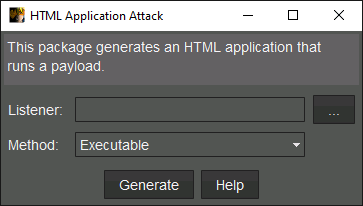
This option generates a payload in `.hta` format, which is a combination of HTML and VBScript. This is a scripting language supported by Internet Explorer, so it became a popular payload format for phishing attacks. The dialog prompts you to select a listener and the method of execution.
The options are:
* **Executable**
\
Drop an exe stager to disk and run it.
* **PowerShell**
\
Uses powershell.exe to run a stager in memory.
* **VBA**
\
Uses a VBA macro to run a stager in memory. The macro is executed by using VBScript to instantiate an instance of *Excel*.*Application* and creating a workbook instance. Require Microsoft Office to be installed on the target.
This HTA always delivers an x86 Beacon payload.